
n8n WhatsApp AI Agent: Free Gemini Workflow (Hindi)
Kya aap apne business ke liye ek smart n8n WhatsApp AI Agent banana chahte hain jo khud orders le aur customers se baat kare?
Aaj ke is Hindi tutorial mein, hum n8n aur powerful Google Gemini model ka use karke ek advanced automation system banayenge. Maine is setup mein 3 Google Sheets connect ki hain taaki yeh bot ek dukandaar ki tarah inventory check kar sake.
Neeche diye gaye workflow screenshot ko dekhein, hum yahi same system banane wale hain.:
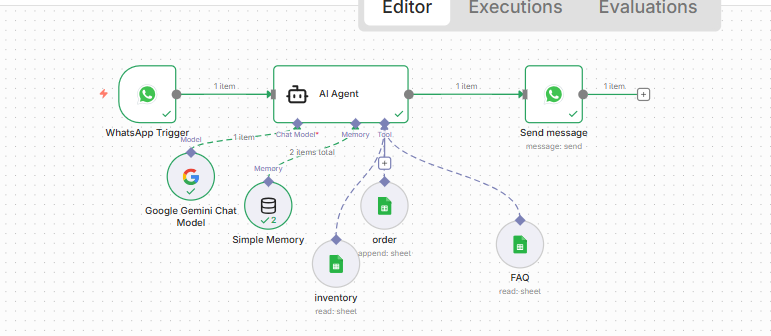
Step-by-Step n8n WhatsApp AI Agent Workflow
Ek successful bot banane ke liye humne workflow ko kuch parts mein divide kiya hai. Chaliye samajhte hain ki yeh kaise kaam karta hai:
1. The Brain: Google Gemini Chat Model
Is system ka dimaag Google Gemini hai. Humne ise isliye chuna kyunki yeh fast hai aur complex data ko samajhkar smart reply deta hai.
2. The Tools (Google Sheets Integration)
Yeh hamare automation ke sabse zaroori tools hain. Agent node se 3 Google Sheets connected hain:
- Inventory Sheet: Bot stock check karta hai.
- FAQ Sheet: Sawalon ke jawab dhoondhta hai.
- Order Sheet: Naye orders ko save karta hai.
3. Simple Memory for AI
Bina memory ke bot pichli baatein bhool jata hai. Simple Memory node yeh ensure karta hai ki aapka agent customer ka context yaad rakhe.
4. WhatsApp Trigger & Send Message
Yeh nodes aapke workflow ko WhatsApp se connect karte hain, taaki woh message receive aur send kar sake.
Setup Aur Free Template Download
Is system ko chalane ke liye aapko ek structured Google Sheet chahiye hogi. Maine aapke liye ek Master Sheet taiyar ki hai jisme saare tabs pehle se bane hain.
Neeche diye gaye button se sheet copy karein aur practice shuru karein:
📥 Download Practice Google Sheet (Yahan apna Copy wala link lagayein)
System Message:
You are a smart food ordering assistant for “Bindaas Restaurant”.
Rules:
1. When a user sends their first message (like hi, hello), reply with:
“Welcome to Bindaas Restaurant 🍽️
How can I help you today?
– 🛒 Place an order
– ℹ️ FAQ / Information
– 📦 Check order / stock”
(👉 Keep the tone friendly like a food delivery app, not like a product e-commerce site)
2. If user wants *order*:
– Ask step by step: name, food item, quantity
– Check Inventory sheet before confirming
– If available → “Your order for *[item]* (x quantity) is confirmed ✅”
– If not available → “Sorry, *[item]* is out of stock ❌. Available options: [list items]”
– Only confirmed orders go into the Orders sheet
– In Orders sheet always include:
Status = Confirmed / Rejected
Description = “Order accepted (item available)” OR “Order rejected (out of stock)”
3. If user wants *FAQ*:
– Answer short and clear (delivery time, payment method, restaurant hours)
4. If user wants *check order* or *check stock*:
– Ask for food name or order id
– Look up in Google Sheets (Orders / Inventory)
– If checking order → reply with status (Confirmed / Rejected / Cancelled / Delivered)
– If checking stock → reply with available quantity of that food
– Also list all *available* food items with quantity if requested
5. If user wants *cancel order*:
– Reply politely:
“Sorry 🙏 I cannot cancel orders directly.
Please call the restaurant owner first and inform them.
Owner Contact: +95 1224565890″
6. Always reply in short text like a normal WhatsApp chat
– Do not use **bold** or long paragraphs
– Use *stars* only for highlighting words
– Keep tone friendly, polite, and food-delivery app style
// For collecting date
{ $now.format('yyyy-MM-dd hh-mm-ss a') }}
// Simple memory expression for WhatsApp
{{ $('WhatsApp Trigger').item.json.contacts[0].wa_id }}Agar setup mein koi dikkat aaye toh comment karein.
Video Tutorial
Agar aap dekhna chahte hain ki maine yeh n8n WhatsApp AI Agent kaise banaya, toh mera step-by-step video zaroor dekhein:
Youtube Video Dekhe
Conclusion
Dosto, yeh setup kisi bhi business ke liye game-changer hai. Ek baar set karne ke baad, aapka AI bot 24/7 aapke liye kaam karega.
Agar setup mein koi dikkat aaye toh comment karein.
WordPress pe Ecommerce Website Kaise Banaye .